
YouTube thumbnails can significantly influence whether a viewer clicks on a video. With hundreds of hours of content uploaded every minute, creators rely heavily on visual cues to differentiate their videos in increasingly crowded feeds. As a result, many creators now use AI-based image generation tools to speed up the process of producing thumbnail concepts, especially if they don't have a background in graphic design.
Tools such as Adobe Firefly, DALL·E, and Canva's AI features allow creators to generate thumbnail-style visuals from text prompts. These systems convert short descriptions into image drafts that can then be refined, edited, or recreated manually. While they do not replace design judgement, they are increasingly being used as a starting point for visual ideation across categories—from tech and gaming to food, travel, and education.
Firefly's text-to-image generator has been designed to transform simple text descriptions into compelling thumbnail graphics, making professional-quality designs for everyone from tech reviewers to cooking channels.
Understanding effective thumbnail prompts
Before diving into specific prompts that can help you get the best generated YouTube thumbnail designs, it's essential to understand what elements make a thumbnail work. Successful YouTube thumbnails typically feature high contrast, clear focal points, bold text placement areas, and emotional resonance.
When writing prompts for AI image generators — regardless of which platform you use — it helps to include the following elements:
Subject: What or who should be in the thumbnail
Style or mood: For example, dramatic, minimal, playful, cinematic, or clean
Colour palette: Bright and saturated, muted and neutral, dark and high-contrast, etc.
Composition: Close-up, wide shot, centred subject, rule of thirds, empty space for text
Lighting: Soft, natural, studio-lit, high contrast, rim lighting, or shadow-heavy
Including these details makes it easier for the model to generate something that resembles a usable thumbnail rather than a generic illustration. These prompts have been used on Adobe Firefly to generate the following images.
1. Tech Review Thumbnails
Prompt: Modern tech gadget on sleek dark surface, dramatic blue and purple neon lighting, minimalist composition, product spotlight, futuristic atmosphere, high contrast, professional studio photography style.
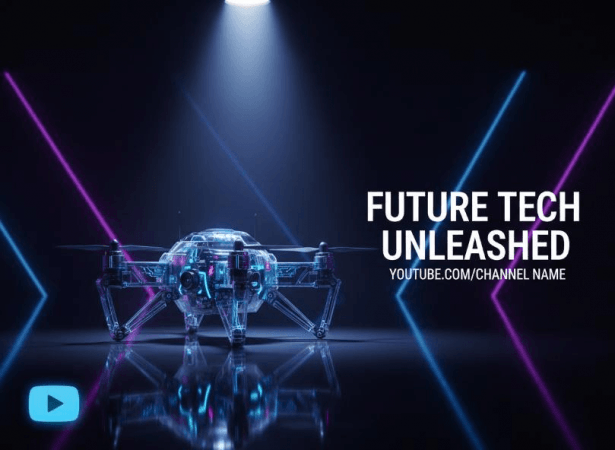
Tech audiences respond to clean, futuristic aesthetics. This prompt creates space for overlay text while maintaining visual interest through dramatic lighting.
2. Educational Content Thumbnails
Prompt: Open textbook with glowing infographics floating above pages, warm library lighting, inspirational learning atmosphere, soft focus background, golden hour sunlight streaming through the window, approachable and inviting mood. Educational creators need thumbnails that promise value without intimidation.

3. Finance and Business Thumbnails
Prompt: Upward trending graph with rupee symbols, professional office background with soft blur, confident business atmosphere, green and gold colour scheme, success visualization, corporate photography style with natural lighting.

Finance content requires credibility signals. Green (growth) and gold (wealth) trigger positive financial associations, while the upward graph provides immediate visual communication of the content's promise, financial improvement, or success strategies.
4. Cooking and Recipe Thumbnails
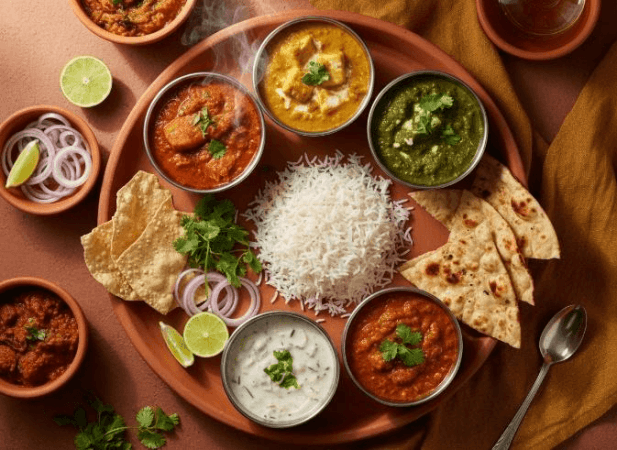
Prompt: Vibrant Indian thali with colourful curries and fresh ingredients, overhead flat lay composition, bright natural daylight, appetizing steam rising, warm terracotta and saffron tones, food photography magazine style.
5. Fitness and Wellness Thumbnails
Prompt: Create a YouTube thumbnail. Athletic person in a dynamic workout pose, energetic neon vibrant colour gradient background, motion blur effect, inspirational fitness atmosphere, powerful silhouette lighting, and sports photography dramatic style. Add text: 10 min full body workout to lose fat in 10 days.

6. Gaming Content Thumbnails
Prompt: Create a YouTube thumbnail. Intense gaming battle scene with explosive effects, vibrant neon pink and cyan colours, action-packed composition, digital art style with comic book elements, dramatic side lighting, and competitive gaming energy. Add text: 5 Hacks to win every gaming battle.

This style has proven effective for Indian gaming creators competing in a saturated market.
7. Travel Vlog Thumbnails
Prompt: Create a YouTube thumbnail of a travel vlog of a couple to Jaipur. Stunning Indian monument during golden hour, traveller silhouette in foreground, epic landscape composition, warm sunset colours with purple sky, sense of adventure and wanderlust, travel photography cinematic style.

8. Comedy and Entertainment Thumbnails
Prompt: Create a YouTube thumbnail. Exaggerated surprised facial expression illustration, bold yellow and red pop art background, comic book style speech bubble space, playful and humorous energy, high saturation colours, graphic design poster aesthetic of a male stand-up comedian in a show. Add text: Presenting funniest show ever.

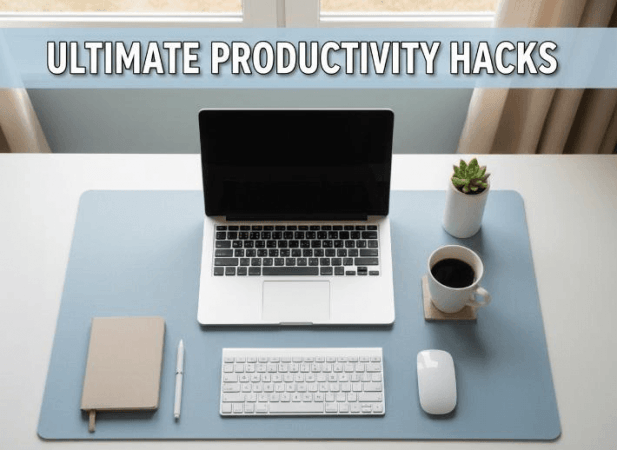
9. Productivity and Lifestyle Thumbnails
Prompt: Organized minimalist desk setup with laptop and coffee, soft morning light through window, calming pastel blue and beige tones, productivity and focus atmosphere, lifestyle blog photography style, top-down angle. With bold productivity-related YouTube thumbnail text.
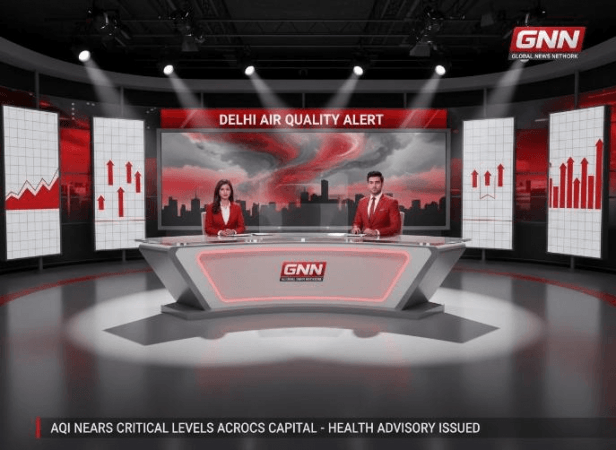
10. News and Current Affairs Thumbnails
Prompt: Breaking news broadcast studio aesthetic, bold red and white color scheme with dramatic lighting, professional journalism atmosphere, clean modern composition with space for text overlay, news channel graphics style.
How to Maximize Your Firefly Results
When using these prompts in Adobe Firefly, remember that specificity improves output quality. Include style references (photography style, art movement, design aesthetic), specify lighting conditions (golden hour, studio lighting, neon), define colour schemes using specific colour names, describe composition (rule of thirds, centred, asymmetric), and indicate mood or atmosphere.
Adobe Firefly's strength lies in understanding natural language, so don't hesitate to be descriptive. Experiment with variations of these prompts by adjusting colours, styles, or subjects to match your channel's unique brand identity.
Democratization of Design
For creators just starting with AI-generated thumbnails, begin with these proven prompts, then refine based on your audience analytics. Track which thumbnail styles generate higher click-through rates, and adjust your prompts accordingly. Adobe Firefly's iterative nature allows for quick testing and optimization, a luxury previously available only to creators with dedicated design resources.
The future of YouTube thumbnail creation is increasingly AI-assisted, and tools like Adobe Firefly are leading this transformation. By mastering prompt engineering, creators can focus more energy on content quality while maintaining professional visual standards that attract and retain viewers.