
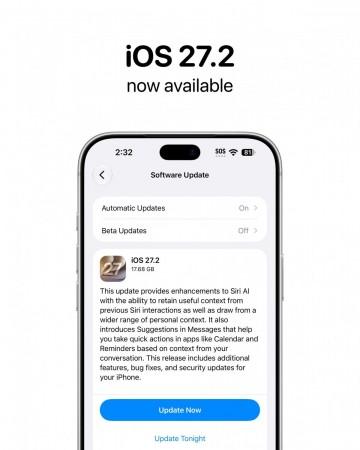
Apple has rolled out the iOS 27.2 update for compatible iPhone models, bringing improvements to Siri AI, contextual suggestions in Messages and several changes across its built-in apps. The update builds on the artificial intelligence features introduced with iOS 27, allowing Siri to recall previous conversations and use more personal context to provide relevant responses.
According to Business Today, the latest update also introduces changes to Photos, Podcasts, Games, Apple TV and FaceTime, along with bug fixes and security improvements. Feature availability varies depending on the iPhone model and region.
iOS 27.2 update: What's new?
1. Siri AI gets smarter with conversation memory
One of the biggest highlights of iOS 27.2 is the improved Siri AI experience. The voice assistant can now recall details from previous interactions, allowing users to ask follow-up questions without repeating the original request.
For instance, if Siri previously recommended a restaurant, users can ask about that recommendation again. Siri can also draw information from photos attached to Messages, Calendar event attendees, voicemails, Safari history and Reading List to provide more context-aware responses.
Apple has also introduced an Excluded Apps setting, allowing users to control which apps Siri, Search and Suggestions can access. Another addition lets users select and copy specific portions of Siri's responses.
The enhanced Siri AI features require an iPhone 16 model or later, or an iPhone 15 Pro or iPhone 15 Pro Max. Availability is also subject to language and regional restrictions.
2. Siri AI expands to five new languages
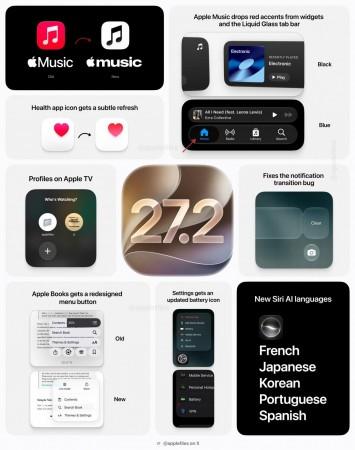
With iOS 27.2, Siri AI adds support for French, Japanese, Korean, Portuguese and Spanish, expanding its language availability beyond English.
However, the enhanced Siri AI experience remains unavailable in the European Union and mainland China at launch, according to Apple's update information.
3. Messages gets contextual suggestions
The Messages app now offers suggestions based on the context of conversations. For example, if someone discusses dinner plans in a chat, the feature can suggest creating a Calendar invitation.
These contextual shortcuts are designed to help users take action directly from conversations without manually switching between multiple apps.
4. Photos adds Shared Albums improvements and AI image identification
The Photos app receives several updates to Shared Albums. Users can edit captions and comments, avoid duplicate photo uploads and receive reminders before albums expire so they can save important pictures and videos.
The update also adds support for SynthID watermarking to help identify images generated or modified using generative AI tools in Photos and Image Playground.
5. Apple TV, Podcasts and Games get updates
Apple has introduced Simple Profiles in the Apple TV app, allowing household members to receive personalised recommendations.
The Podcasts app now separates its Home tab into New Episodes and Continue Playing sections, making it easier to find new content and resume previously started episodes.
Meanwhile, the Games app adds more context to friend suggestions and displays recently played games on friends' profiles.
6. FaceTime adds support for interpreters and live captioners
FaceTime now supports adding a third-party sign language interpreter or live captioner to a call. The feature is intended to improve accessibility for people who need assistance communicating during video calls.
How to download iOS 27.2 on your iPhone
Compatible iPhone users can check for the update by following these steps:
- Open Settings on your iPhone.
- Tap General.
- Select Software Update.
- Wait for the device to check for available updates.
- If iOS 27.2 appears, tap Update Now or Download and Install and follow the on-screen instructions.
Before installing the update, it is advisable to back up your iPhone, connect to a stable Wi-Fi network and ensure that the device has sufficient battery charge or is connected to power.
Should you install iOS 27.2?
The update brings meaningful improvements for users who rely on Siri AI, Messages and Apple's built-in apps. The ability to recall earlier conversations and use additional personal context could make Siri more useful for everyday tasks, while the Photos and FaceTime changes improve convenience and accessibility.
Users with compatible devices should also consider installing the update for its bug fixes and security improvements. However, some features are restricted by device compatibility, language or region, so not every iPhone user will receive the same experience.