
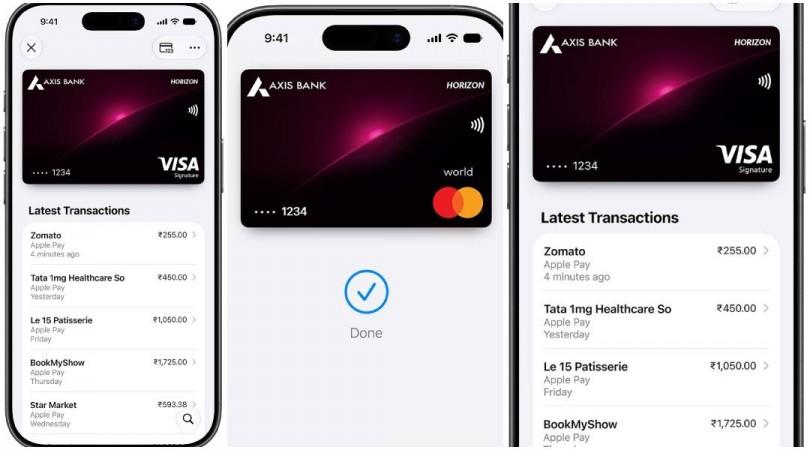
Apple Pay has officially launched in India, giving users a new way to make secure and contactless payments using their Apple devices. The service is now available on iPhone, iPad and Apple Watch, while support for Mac is coming soon.
The launch allows users to make payments in stores, apps and on websites without repeatedly entering card details, PINs or OTPs at checkout. At launch, Apple Pay is available for eligible Axis Bank-issued Visa and Mastercard credit cards.
Which banks support Apple Pay in India?
Axis Bank is the only bank supported at launch. Customers with eligible Axis Bank-issued Visa and Mastercard credit cards can add their cards to Apple Wallet and use Apple Pay for contactless and online payments.
Other major banks, including HDFC Bank, ICICI Bank and SBI, are not supported at launch. Apple is expected to expand support to additional banks and card issuers as the service develops in India.
Not every Axis Bank credit card may be eligible, so customers should check whether their specific card can be added to Apple Wallet.
How to set up Apple Pay
Setting up Apple Pay is straightforward.
- Make sure your iPhone is XR or later and running the required software.
- Open the Wallet app on your iPhone.
- Tap the "+" button.
- Follow the instructions to add an eligible Axis Bank credit card.
- Customers can also add an eligible card through the latest Axis Bank app.
- Complete the verification process required by the bank.
Once the card has been successfully added and verified, it can be used with Apple Pay.

How to use Apple Pay in stores
Apple Pay can be used at merchants that accept contactless NFC payments.
To make a payment using an iPhone:
- Double-click the side button.
- Authenticate with Face ID, Touch ID or your device passcode.
- Hold the top of the iPhone near the contactless payment terminal.
- Wait for the payment confirmation.
Apple Watch users can double-click the side button and hold the display near a contactless reader to complete the transaction.
How to use Apple Pay online and in apps
Apple Pay can also be used for purchases in supported apps and on websites.
At checkout, users can select Apple Pay, review the payment information and authenticate using Face ID, Touch ID or their device passcode.
This means users do not have to repeatedly enter their card number, billing details, shipping information or other payment details.
Where can Apple Pay be used in India?
At launch, Apple Pay is available across a large network of merchants and apps in India, including Apple Store locations, Blinkit, Chaayos, Comet, Croma, Interflora, Ixigo, Le15 Patisserie, Reliance brands, Tata 1mg and Zomato, among others. Apple has also worked with payment service providers including Cashfree, JusPay, Mswipe, Paytm, PayU, Pine Labs, Razorpay and Worldline to expand merchant acceptance.
Apple Pay can be used wherever the participating merchant supports the relevant Apple Pay or contactless payment option.
How secure is Apple Pay?
Security and privacy are key features of Apple Pay. The actual card number is not stored on the device or Apple servers and is not shared with merchants.
Instead, Apple uses a unique Device Account Number, which is encrypted and stored in the device's Secure Element. This helps keep the customer's actual card details private during transactions.
Apple also says it does not retain transaction information that can be linked back to the user. Transactions remain between the customer, merchant and card issuer.
If an iPhone or Apple Watch is lost or stolen, users can use the Find My app to locate, lock or suspend payments from the device.
What devices support Apple Pay?
At launch, Apple Pay is available on:
- iPhone XR and later
- iPad
- Apple Watch Series 6 and later
- Mac support coming soon
Will card rewards continue?
Yes. Users will continue to receive the applicable rewards and benefits offered by their eligible credit cards when making purchases through Apple Pay.